
Hey, welcome back to the new look
Before we move on to how to maintain your site in a top position in Google you have to get it there first! You may have a beautiful website design but if you have no SEO it will get lost in the black hole that is Google and nobody will ever find it let alone buy stuff or contact you from it.
To help you identify and target the correct SEO for your website to move up Google here are my top 3 tips and tools.
1. Do you have any existing SEO?
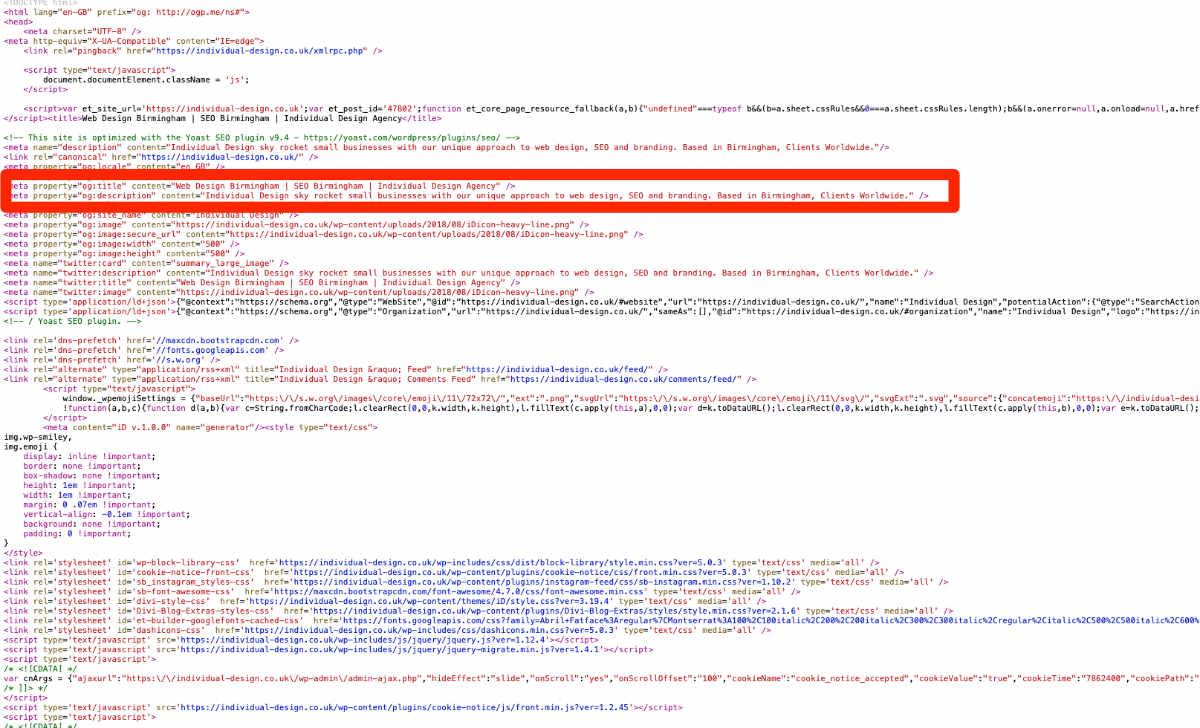
To check to see if your web designer has included SEO on your website simply open your homepage in Google Chrome and right click your mouse on the page, select: view-source. Don’t worry about the mass of code you can see, we are looking for two very specific lines which are meta-tags and meta-description. These basically tell Google what your web page is about. It is also the information that appears in the Google search list. If your developer has entered some RELEVANT information here you have some form of very basic but essential SEO.
Below is a screenshot showing you what you should see and the bits to look out for.
2. Is your SEO targeted correctly?
I once had a new client who told me she ranked in position 1 for her keyword but was surprised she wasn’t getting more enquiries. When I researched it her “keyword” was actually a very poor performing one. She thought she was doing great with “bridal boutique” when all her customers were searching for “wedding dresses” or “bridal shops” Research is key to choosing your website keywords.
TOP TOOL: Go to google keyword planner https://ads.google.com/aw/keywordplanner/
Here you type in the words you think are relevant and google will tell you how popular they are with people searching the web. You may find you have the right ones from the get-go or pick up some more closely targeted ones. The list that Google provides you with will show you your search words and a range of similar words plus how often they are searched for each month. You should pick 3-4 as your main keywords.

3. Implement SEO on your WordPress website.
Use the Yoast SEO plugin https://en-gb.wordpress.org/plugins/wordpress-seo/
Add the previously mentioned meta title and meta descriptions across each page of your website. The Yoast plugin will add a section under the main content area where you can optimise page title and meta description. It is key to do this for every PAGE to maximise your SEO.
TOP TIP: Remember your page title and description should include relevant keywords to the information on the page. This is where you can be more specific and not just use the main keywords but more targeted ones.
Meta Title example:
My project page – La Couture Bridal would say something like:
Bridal Shop Website Design Project for La Couture Bridal | Individual Design
I am including my main keywords “web design” and helping it be more targeted to a sector I work quite often in “bridal” If I had left this as standard without editing it via Yoast it would have just said:
La Couture Bridal | Individual Design
Meta Description Example:
Clean, chic web design for a Birmingham bridal shop. Individual Design worked closely with the client to create an engaging, contemporary website. Find Out More Here.
This is where you use more emotive language because we are trying to encourage the reader to click the page. Of course, your meta description should include your keywords but it needs to be engaging for your audience. Here I managed to get my keyword “website design”, a location, and a specific sector. I also used words to encourage people to click: clean, contemporary, engaging. Maybe the reader will want to see that for themselves?
There are my three top SEO tips to help your website perform better today. To maximise your chances of a Google top spot join our mailing list below and get access to the other VITAL SEO hacks I use every day.
Let us know how you get on with your on-page SEO below.
Good Luck!
Jo
Recent Comments